MEMLNaut Firmware: MEMLCelium
Overview
MEMLCelium is a three-voice rhythm machine. Each voice is a PAF (phase-aligned formant) synth with amplitude and pitch envelopes, biased towards drum-like sounds. Ratio sequencers plays the three voices. The neural network controls 83 parameters, including the rhythms, the formants, the envelopes and effects. You shape them with the NISPS controls.
Try it in your browser
You can play MEMLCelium without a MEMLNaut. The browser version runs the firmware’s own synth and the NISPS learning engine, compiled to WebAssembly, with the panel’s controls on screen. It works with a mouse, a touchscreen, the keyboard or a gamepad. Your models are saved in the browser.
Outputs
Mono sound is output to all channels of the line out and headphone sockets.
Quick start
- Flash the firmware and turn up G.
- The sequencer starts playing as soon as the firmware starts. Push toggle B down to stop or restart it.
- Set the tempo with knob Y.
- Move the joystick, then like, dislike, drag and jolt as described on the NISPS page.
Controls
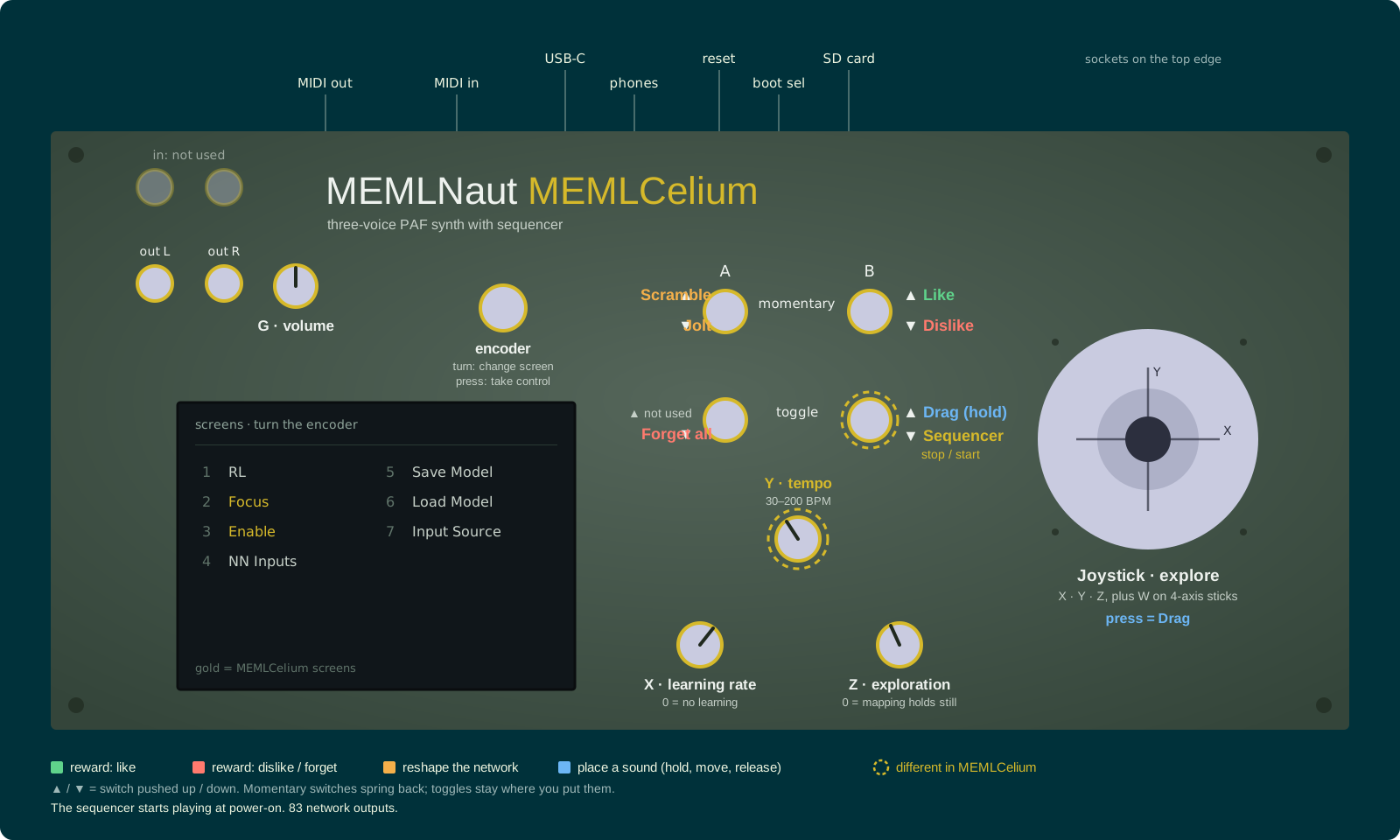
Click the panel to enlarge it. Controls ringed in gold work differently from the standard NISPS controls.
The controls are the standard NISPS controls, with these changes:
| Control | In MEMLCelium |
|---|---|
| Knob Y | Tempo, from 30 to 200 BPM |
| Toggle B down | Stop or restart the sequencer |
The network’s input defaults to the joystick. You can change it on the Input Source screen.
Screens
MEMLCelium adds two screens after the RL screen.
RL: the 83 outputs are labelled by section: Seq, V1, V2 and V3.
Focus: choose which groups of parameters the network changes. The groups are Seq (the sequencer’s rhythms), Synth (the sound of each voice), Env (the envelopes), and Voice 1, Voice 2 and Voice 3. Groups overlap, so selecting Env and Voice 2 together focuses on everything in either group.
Enable: turn each voice on or off. Highlighted voices are on.
Parameters
| Outputs | What they control |
|---|---|
| 0–20 | Sequencer: 7 per voice |
| 21–43 | Voice 1: base frequency, 3 formant centres and bandwidths, vibrato, frequency shifts, amplitude and pitch envelopes, sine shaper, ring modulation |
| 44–62 | Voice 2: base frequency, detune, formants, frequency shifts, envelopes |
| 63–82 | Voice 3: as voice 2, plus ring modulation |
Files
Code
https://github.com/MusicallyEmbodiedML/MEMLNaut-NISPS. To build this firmware, define MODE_MEMLCELIUM in MEMLNaut-NISPS.ino.
Firmware Download
One file works with both 3D and 4D joysticks. It starts on the 3D joystick, so if you have a 4D joystick, choose 4D Joystick on the Input Source screen. Your choice is saved.
MEMLNaut-NISPS.MEMLCelium.1.2.0.uf2
See the firmware guide for installation instructions.