MEMLNaut Firmware: MixMasterMEML
Overview
MixMasterMEML is a self-contained glitch ambient groove machine. It has three sequenced drum voices, a bassline, a euclidean arpeggiator, a sine shaper and a stereo grain delay, with a mixer to balance them. The neural network controls 122 parameters, and you shape them with the NISPS controls. It’s an experiment to explore how NISPS might be used to control a complete composition.
Signal path
The three drum voices are PAF (phase-aligned formant) synths. They are mixed and pass through the sine shaper and EQ. The arpeggiator joins them, and everything goes into the grain delay. The bass is added after the delay, so it always stays clean and dry. A final soft limiter follows the master fader.
Outputs
Stereo sound is output to the line out and headphone sockets. The grain delay spreads the sound across the stereo field.
Quick start
- Flash the firmware and turn up G.
- The sequencer starts playing as soon as the firmware starts. Push toggle B down to stop or restart it.
- Set the tempo with knob Y.
- Move the joystick, then like, dislike, drag and jolt as described on the NISPS page.
- Use the Mixer screen to balance the parts.
Controls
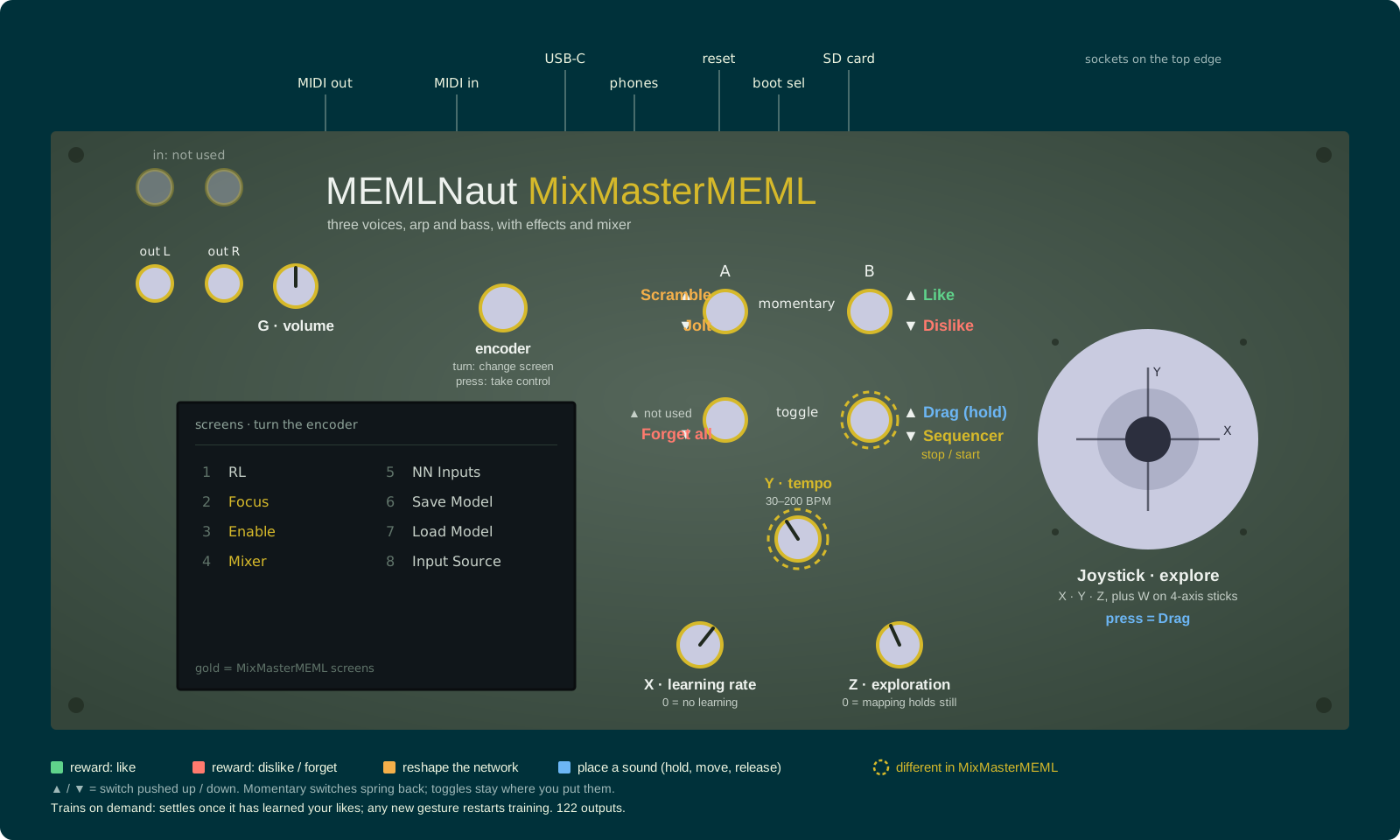
Click the panel to enlarge it. Controls ringed in gold work differently from the standard NISPS controls.
The controls are the standard NISPS controls, with these changes:
| Control | In MixMasterMEML |
|---|---|
| Knob Y | Tempo, from 30 to 200 BPM (instead of reward scale) |
| Toggle B down | Stop or restart the sequencer |
The network’s input defaults to the joystick. You can change it on the Input Source screen.
Train on demand
MixMasterMEML stops training once the network has learned your likes, and starts again when you add a like, dislike, drag or jolt, scramble, or load a model. While it is settled, the mapping stays fixed, so the exploration knob (Z) wanders around a stable set of sounds.
Screens
MixMasterMEML adds three screens after the RL screen.
RL: the 122 outputs are labelled by section: Seq, V1, V2, V3, FX, Arp and Bass.
Focus: choose which groups of parameters the network changes. The groups are Seq, Synth, Env, Voice 1, Voice 2, Voice 3, FX, Arp and Bass.
Enable: turn parts on or off. The parts are Voice 1, Voice 2, Voice 3, Arp, Bass, Shaper and Delay. Highlighted parts are on. Turning the delay off makes it dry, but it keeps filling its buffer, so it comes back without a gap.
Mixer: faders for V1, V2, V3, Arp, Bass, Delay (the wet return) and Master. The mix is remembered when you turn the MEMLNaut off.
Parameters
| Outputs | What they control |
|---|---|
| 0–23 | Drum sequencers, 8 per voice: 3 ratios, speed, offset, 3 note levels |
| 24–85 | Drum voices: formants, frequency shifts, envelopes, sine shaper, ring modulation |
| 86–91 | Grain delay: grain length, time, feedback, pitch, spread, wet/dry |
| 92–104 | Arpeggiator: step length, Euclidean hits, steps and rotation, octaves, pattern, waveform, grain length, pitch and pitch spread, attack, release, level |
| 105–112 | Bass sequencer, as for the drum voices |
| 113–119 | Bass sound: formant, bandwidth, ADSR envelope, level |
| 120–121 | Bassline: slope and bend of the 4-note pitch curve |
Files
Code
https://github.com/MusicallyEmbodiedML/MEMLNaut-NISPS. To build this firmware, define MODE_MIXMASTERMEML in MEMLNaut-NISPS.ino.
Firmware Download
MEMLNaut-NISPS.MixMasterMEML.1.2.0.uf2
See the firmware guide for installation instructions.